

Most ERP scheduling modules assume every machine has unlimited capacity. Your shop floor knows better. The gap between the two shows up as late orders, weekend overtime, and machines sitting idle while urgent jobs wait for parts.
Many plants close that gap with spreadsheets, whiteboards, and one experienced scheduler who knows which jobs can slip. That holds up until the scheduler takes a week off, or until order volume grows faster than anyone can rebuild the plan by hand.
AI production scheduling software handles this problem directly. It builds a realistic schedule from your actual capacity, materials, and labor. When a machine fails or a rush order lands, it rebuilds the plan in minutes.
Below, you’ll see what AI production scheduling software actually does, which features matter, what it costs, and how to roll it out without disrupting the floor. You’ll also get a clear way to decide between buying a platform and building around your current ERP.
What Is AI Production Scheduling Software?
AI production scheduling software assigns jobs to machines, people, and time slots based on real constraints. Those include capacity, routings, setup times, material availability, and due dates. It then keeps adjusting the plan as conditions change on the shop floor.
A static schedule is a snapshot, and it goes stale the moment a machine goes down. AI-powered production scheduling reacts the way a good planner would, only faster and across far more variables.
How AI Production Scheduling Works
Most systems follow the same basic loop:
- Collect data: The software pulls open orders, routings, cycle times, inventory, shift calendars, and machine status from your ERP, MES, and shop floor systems.
- Apply constraints: It models what’s actually possible, including finite machine capacity, tooling, operator skills, material arrivals, and maintenance windows.
- Generate and score options: Optimization algorithms test thousands of job sequences against your goals, such as on-time delivery, fewer changeovers, or less overtime.
- Learn and adjust: Machine learning models refine cycle-time estimates and demand forecasts from historical data. When a disruption hits, dynamic rescheduling produces a new plan.
Three Types of AI Behind Scheduling Tools
The AI label covers very different technologies. Under the hood, most tools use one of three approaches, or a mix:
- Constraint-based scheduling engines: Use mathematical optimization to find feasible, high-scoring schedules
- Machine learning models: Predict cycle times, downtime risk, or demand
- Rules and heuristics: Encode priorities like “run hot orders first” or “group by color”
Before you shortlist any AI production scheduling software, ask which approach it uses and what data it needs. A machine learning model without a constraint engine behind it can produce schedules that look clever on screen but can’t run on the floor.
AI Scheduling vs. Excel, ERP, and Traditional APS
Advanced planning and scheduling (APS) software has handled finite capacity scheduling for decades. Traditional APS depends on fixed rules and static parameters that planners maintain by hand.
AI scheduling adds prediction and learning. Its estimates get more accurate over time, and it copes better with uncertainty. Here’s how the four common approaches compare:
| Excel/ Whiteboard | ERP Scheduling Module | Traditional APS | AI Scheduling | |
|---|---|---|---|---|
| Capacity model | Planner’s judgment | Often infinite capacity | Finite capacity | Finite capacity with learned estimates |
| Response to disruption | Manual rebuild | Slow, manual | Rule-based reschedule | Automatic rescheduling with scored options |
| Forecasting | None | Basic | Limited | Machine learning demand and cycle-time prediction |
| Setup effort | Low | Low | Moderate to high | Moderate to high |
| Dependency on one person | Very high | High | Medium | Low |
When Excel and ERP Scheduling Stop Working
If several of these sound familiar, your current scheduling process is costing you more than it should:
- The schedule changes several times a day, and each change means rework
- On-time delivery keeps missing target even when the plant looks busy
- Planners spend hours a week maintaining spreadsheets
- Expediting and overtime have become routine
- Only one or two people truly understand how the schedule works
- Machines sit idle while late orders wait for material or tooling
Watch the last two closely. They point to a plan built on assumptions instead of actual capacity, and no amount of extra effort fixes that.
Key Features of AI Production Scheduling Software
Product feature lists run long. The production scheduling software features below are the ones that change results on the floor, so use them as your evaluation checklist.
Finite Capacity and Constraint Management
Finite capacity scheduling software should schedule against what your plant can actually do: real machine hours, shift patterns, tooling limits, and operator certifications. If a tool treats capacity as a number on a calendar, it will overload your bottleneck and still call the plan feasible.
Dynamic Rescheduling for Downtime and Rush Orders
When a spindle fails mid-shift or a customer pulls an order forward, good AI production scheduling software rebuilds the affected part of the schedule automatically.
Look for a “frozen zone” setting. It locks jobs already in progress so the system doesn’t reshuffle the floor every hour, a problem planners call schedule nervousness.
Job Sequencing and Setup Time Reduction
Setup times often depend on what ran before. For example:
- Plastics shops run light colors before dark
- Food plants sequence by allergen
- Machine shops group jobs by tooling family
Good AI scheduling learns these sequence-dependent changeovers. It then orders jobs to cut total setup time without missing due dates.
Material, Labor, and Machine Availability
A job isn’t ready just because a machine is free. The software should check inventory, inbound purchase orders, and operator availability before releasing work.
That’s why data from cloud-based inventory systems or a warehouse management system matters so much. The schedule can only be as accurate as your material data.
What-If Scenario Planning
Before you accept a large order or add a weekend shift, you should be able to test the impact. Scenario planning, sometimes built on a lightweight digital twin of your plant, shows how one decision ripples through every other order.
ERP, MES, and Shop Floor Integration
Production scheduling ERP integration needs to work both ways. Orders and routings come in from the ERP, and actual job status comes back from the MES or shop floor terminals.
Without that feedback loop, the schedule falls out of sync with the floor within a day. If you’re new to connecting AI tools with existing systems, this overview of AI integration covers the basics.
Demand Forecasting and Predictive Maintenance Signals
Some AI production planning software goes further, feeding machine learning demand forecasts into capacity planning. It can also pull predictive maintenance alerts from sensor data, so the scheduler plans around a likely failure instead of reacting to one.
Schedule Visibility, Alerts, and KPI Reporting
Each group in the plant needs something different from the same system:
- Planners: An interactive Gantt view they can adjust
- Supervisors: Alerts when a job is at risk of running late
- Leadership: KPIs like OEE, schedule adherence, and on-time delivery (OTD)
Feature-to-problem map:
| Feature | Problem It Solves | KPI to Watch |
|---|---|---|
| Finite capacity scheduling | Overloaded bottlenecks, unrealistic promise dates | Schedule adherence |
| Dynamic rescheduling | Machine downtime, rush orders | On-time delivery |
| Job sequencing | Long, frequent changeovers | Changeover time, OEE |
| Material availability checks | Jobs started without parts | WIP levels, idle time |
| What-if planning | Risky order acceptance | Quote-to-delivery accuracy |
| ERP/MES integration | Outdated schedule data | Planning hours per week |
| Alerts and reporting | Late surprises | Late orders per week |
Benefits of AI Production Scheduling for Manufacturers
The benefits of production scheduling software for manufacturers show up in KPIs you probably track already. How much each one moves depends on your data quality and production complexity, so measure your baseline first.
Higher On-Time Delivery
When promise dates come from real capacity instead of hopeful estimates, you hit more of them. Sales also gets credible delivery dates to quote, which cuts down on the “can we squeeze this in?” calls.
Less Idle Time at the Bottleneck
Every plant has a constraint that sets its pace. AI scheduling keeps that resource fed with ready jobs and plans upstream work around it. Bottleneck analysis turns from a quarterly exercise into a daily habit.
Lower Overtime and Changeover Costs
Better sequencing means fewer setups. Fewer setups mean more productive hours inside the regular shift. That combination usually shows up first as reduced overtime.
Faster Response to Order Changes
When a customer changes an order, you can see the impact on everything else in minutes. That lets you give a confident answer the same day instead of promising to “get back to them.”
Less Dependence on One Scheduler
Many plants run on the knowledge of one person who knows every machine’s quirks. That’s a real risk when skilled workers are hard to replace.
Deloitte and The Manufacturing Institute project that US manufacturing may need up to 3.8 million workers between 2024 and 2033, and about half of those roles could go unfilled. Capturing scheduling logic in software protects you when experienced people retire or leave.
Industries That Benefit Most From AI Scheduling
Plants with high product mix, tight delivery windows, or costly changeovers usually see the clearest gains from AI manufacturing scheduling software:
| Industry | Scheduling Challenge | What AI Scheduling Handles |
|---|---|---|
| Automotive suppliers | JIT windows, shifting releases | Rapid rescheduling against customer release changes |
| Industrial machinery | Long routings, shared work centers | Multi-step finite capacity across departments |
| Metal fabrication and machining | High-mix job shop scheduling | Sequencing by tooling and setup families |
| Plastics and polymers | Mold availability, color changes | Mold constraints and color sequencing |
| Food and beverage | Shelf life, sanitation cycles | Allergen sequencing and cleaning windows |
| Electronics assembly | Component shortages, line balancing | Material-aware job release |
AI Production Scheduling Software Cost & ROI
There’s no standard price for AI production scheduling software. Cost depends on how complex your plant is and how much integration work stands between the scheduler and your data.
What Drives Production Scheduling Software Cost
- Number of machines, work centers, and constraints to model
- Number and age of systems to integrate (ERP, MES, inventory, maintenance)
- State of your routing and cycle-time data
- Cloud or on-premise deployment
- Number of users and plants
- Custom rules that off-the-shelf tools don’t support
Common Pricing Models
Most options fall into one of three models:
- SaaS subscription: Monthly or annual fees, often priced per user, site, or resource. Lower upfront cost, ongoing spend.
- APS license plus services: A software license plus implementation and consulting fees. Configuration work can be substantial.
- Custom build: One-time development cost plus hosting and support. Higher upfront investment, but you own the system and the logic.
Whichever route you choose, budget separately for data cleanup and integration. Buyers underestimate these more than anything else.
How to Estimate Production Scheduling ROI
Compare expected annual value with total cost over three years. Annual value usually comes from four places:
- Overtime hours reduced
- Bottleneck hours recovered, multiplied by contribution margin per hour
- Inventory and WIP carrying costs reduced
- Late-delivery penalties avoided
Hypothetical example (illustrative numbers only):
A 150-person plant pays for 400 overtime hours a month at a loaded rate of $45.
- Better sequencing cuts overtime by 25%: $4,500 a month, or $54,000 a year
- Shorter changeovers free 10 bottleneck hours a month at $300 contribution margin per hour: $36,000 a year
- Total: $90,000 in annual value, before counting WIP reduction or avoided penalties
Compare that figure with three years of software, integration, and support costs to find your payback period.
Ask anyone you evaluate to build the ROI case on your numbers, not their customer averages.
How to Implement AI Production Scheduling Software
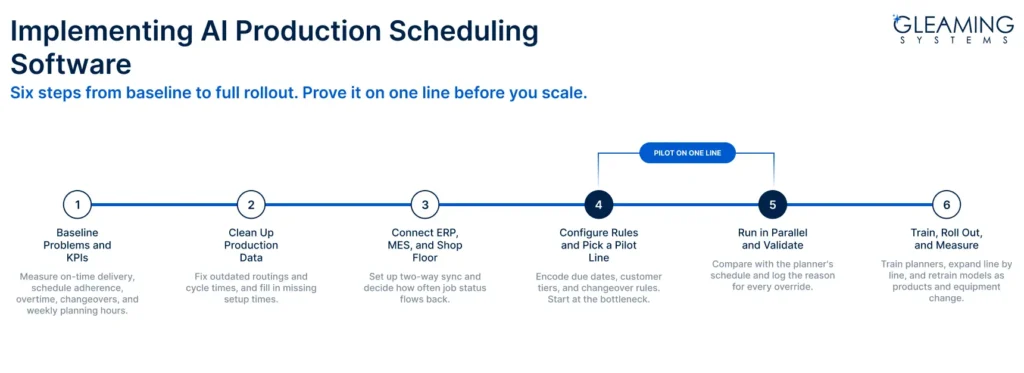
Plan for a phased rollout, not a big-bang launch. Timelines depend mostly on data readiness and integration complexity, not the software itself. Here’s a production scheduling software implementation path that keeps risk low.
Step 1: Baseline Your Scheduling Problems and KPIs
Write down what’s broken and measure it. Record current on-time delivery, schedule adherence, overtime hours, changeover time, and weekly planning hours. Without a baseline, you can’t prove the project worked.
Step 2: Clean Up Production Data
AI production scheduling software will believe whatever your routings say. If cycle times are five years old or setup times are missing, the schedule will be confidently wrong. A quick test: pull routings for your 20 highest-volume parts and compare them with what actually happens on the floor.
Step 3: Connect ERP, MES, and Shop Floor Systems
Integration is usually the longest step. Map which system owns which data, set up two-way sync, and decide how often status updates flow back. Older or heavily customized ERPs often need custom connectors. Working with an AI ML integration company in Columbus Ohio, that has done this before can save months of internal trial and error.
Step 4: Configure Rules and Pick a Pilot Line
Encode your priorities, such as due dates, customer tiers, and changeover rules. Then choose one line or cell for the pilot. Pick the bottleneck or the area with the most scheduling pain, because that’s where results will be easiest to see.
Step 5: Run in Parallel and Validate
Run the AI schedule alongside your planner’s schedule for a few weeks. Let planners review, compare, and override recommendations, and log the reason every time they do. Those overrides reveal missing constraints faster than any workshop.
Step 6: Train, Roll Out in Stages, and Measure
Expand line by line once the pilot holds up. Train planners and supervisors on why the system makes its choices, not just which buttons to press. After go-live, models need retraining as products and equipment change. Plan for ongoing software maintenance and support from day one.
Common Implementation Roadblocks
- Inaccurate routings and outdated cycle times
- Missing machine data from older equipment
- Planners who don’t trust a “black box” recommendation
- No executive sponsor when the pilot hits friction
- ROI expectations set before the baseline was measured
KPI checklist to track before and after deployment
- Schedule adherence
- On-time delivery
- Throughput at the bottleneck
- Average changeover time
- Overtime hours
- Planner hours spent on scheduling per week
- WIP levels
How to Choose the Right AI Production Scheduling Solution
The right choice depends less on the longest feature list and more on how well the AI production scheduling software fits the way you make things.
Match the Software to Your Production Model
- Job shops: Need flexible routing and heavy sequencing logic
- Repetitive manufacturers: Care more about line balancing and rate-based scheduling
- Batch and process plants: Need recipe, cleaning, and shelf-life constraints
Ask for a demo built on your own parts and routings, not generic demo data.
Check ERP and MES Compatibility
Confirm the software has working connectors for your exact ERP version, not just your ERP brand. Ask how it handles custom fields and how often data syncs. Then talk to a reference customer running the same system.
Your IT team should also ask where scheduling data is hosted, how user access is controlled, and how the system fits your existing security policies.
Insist on Explainability and Planner Control
Planners should be able to see why a job was placed where it was, and override it. Systems that can’t explain their decisions get ignored on the floor, no matter how good the math is.
Compare Total Cost and Scalability
Look at three-year cost, including integration, training, support, and per-user fees as you grow. Manufacturing production scheduling software that’s affordable for one plant can get expensive across three.
When Custom Production Scheduling Software Makes Sense
Off-the-shelf tools cover common scenarios well. They struggle when:
- Your scheduling rules are unusual
- Your ERP is heavily customized or outdated
- You run several plants with different processes
In those cases, custom production scheduling software built on top of your existing systems often costs less over time than forcing a platform to fit.
Working with a custom software development company in the USA also means you own the scheduling logic. That matters when the logic reflects years of process knowledge.
For the AI models themselves, look for an AI development company in the USA with real optimization experience, not just chatbot projects.
| Factor | Off-the-Shelf Scheduling Tool | APS Platform | Custom AI Scheduling |
|---|---|---|---|
| Time to first value | Fastest | Moderate | Moderate to longer |
| Fit with unique processes | Limited | Good with configuration | Built around your rules |
| ERP/MES integration | Standard connectors | Broad but complex | Built for your systems |
| Ownership of logic | Software provider | Software provider | You |
| Cost profile | Low upfront, recurring fees | License plus services | Higher upfront, lower recurring |
| Best fit | Simpler, standard operations | Mid-to-large plants with standard ERPs | Complex constraints, legacy systems, multi-plant |
No option wins everywhere. The right answer depends on how far your process is from “standard.”
Frequently Asked Questions
Does AI Scheduling Work With Existing ERPs?
Yes. Most AI production scheduling software connects to ERPs like SAP, Epicor, Microsoft Dynamics, Plex, or Infor through APIs or middleware. The ERP stays your system of record for orders and inventory. Older or heavily customized ERPs may need custom connectors.
What’s the Difference Between AI Scheduling and APS?
Traditional APS software runs on fixed rules and parameters that planners maintain by hand. AI scheduling adds machine learning to predict cycle times, demand, and disruptions, and it improves with your data. Many APS platforms now include AI features, so the line is blurring.
Is AI Scheduling Practical for Small Manufacturers?
Often, yes, especially in high-mix shops. A 60-person job shop with 40 machines and hundreds of active jobs can gain more than a large plant running one product. Start with a scoped pilot rather than a full rollout.
How Long Does Implementation Take?
It depends mainly on data quality and integration complexity. A single-line pilot with clean data moves much faster than a multi-plant rollout on legacy systems. A phased approach keeps disruption low and shows results early.
What Data Does AI Scheduling Need?
At minimum, AI production scheduling software needs open orders, routings, cycle times, setup times, machine and shift calendars, and inventory levels. Real-time machine status and production history improve accuracy. Gaps aren’t a deal-breaker, but fix them before trusting the schedule.
Will AI Replace Production Planners?
No. It replaces the hours planners spend rebuilding spreadsheets. Planners still set priorities, handle customer trade-offs, and override the system when they know something it doesn’t. Most teams find their planners shift from data entry to decision-making.
What’s the Best Alternative to Excel Scheduling?
For simple operations, an ERP scheduling module may be enough. With finite capacity, sequence-dependent setups, and frequent rescheduling, automated production scheduling through an AI or APS tool is the practical next step. Spreadsheets break when the plan changes faster than one person can update it.
Should You Build or Buy Scheduling Software?
Buy if your processes are standard and the connectors fit your ERP. Build or extend if your rules are unique or your systems are legacy. Many manufacturers choose a hybrid: a custom AI layer on top of their existing ERP.
Improve Your Manufacturing Schedule With AI
AI production scheduling software won’t fix bad data or replace good planners. It gives your team a schedule that matches actual capacity and keeps up when conditions change.
Results depend on production complexity, data quality, integration, and adoption. Get those right, and the gains show up in on-time delivery, overtime, and fewer last-minute schedule rebuilds.
For Ohio manufacturers, the stakes are high. Manufacturing generated $137.9 billion in GDP and 16.5% of Ohio’s private economy in 2024, according to the Ohio Manufacturers’ Association. Plants across the Midwest compete on delivery reliability, and scheduling drives much of it.
At Gleaming Systems, an AI software development company in Ohio, we build scheduling and operations software around the systems businesses already run.
Our quality deficiency management system project, for example, combined automated scheduling, real-time reporting, and offline mobile data capture for field teams. The same building blocks apply on the shop floor.

Team Gleaming Systems
Team Gleaming Systems is a group of tech experts specializing in software, web, and mobile app development. We create innovative, scalable solutions to help businesses succeed in the digital world. Stay tuned for expert insights and industry trends!