
Most manufacturers don’t start shopping for manufacturing ERP software because things are running smoothly. They start because the production schedule lives in one spreadsheet, inventory lives in another, and nobody trusts either by Thursday afternoon. Purchasing reorders material that’s already on the shelf. Quality records sit in a binder until an auditor asks for them.
That friction gets more expensive every year. Deloitte and The Manufacturing Institute estimate that as many as 1.9 million US manufacturing jobs could go unfilled through 2033, so your team can’t keep absorbing manual work. Add volatile supplier lead times and new plants from reshoring, and disconnected systems stop being an annoyance. They become a ceiling on growth.
You’ve probably outgrown your current setup if:
- Planners rebuild the schedule by hand every time an order changes
- System inventory and physical counts rarely match
- Nobody can see work-in-progress without walking the floor
- Month-end close depends on exports and manual reconciliation
- Each plant runs on a different system
This guide covers what manufacturing ERP software does, what it really costs, whether to buy, customize, or build, and what implementation involves.
What Is Manufacturing ERP Software?
Manufacturing ERP software is a single system that connects production, inventory, purchasing, quality, sales, and finance around one shared set of data. When a work order closes on the floor, inventory, job costs, and customer delivery dates update without anyone re-keying numbers.
It’s often confused with the systems that sit beside it:
| System | What it manages | Time horizon |
|---|---|---|
| ERP | The whole business: orders, materials, production, finance | Days to months |
| MRP | Material planning: what to buy or make, and when | Weeks to months |
| MES | Shop-floor execution: machines, operators, real-time output | Minutes to shifts |
| WMS | Warehouse operations: receiving, putaway, picking, shipping | Hours to days |
Most manufacturing ERP systems include MRP as a module. MES and WMS are usually separate systems connected to the ERP.
Fit also depends on how you make products. Discrete and process manufacturing, mixed-mode, job shop, make-to-order, and engineer-to-order operations each need different planning logic. Confirm that a system handles your production model before you compare anything else.
Key Features of Manufacturing ERP Software
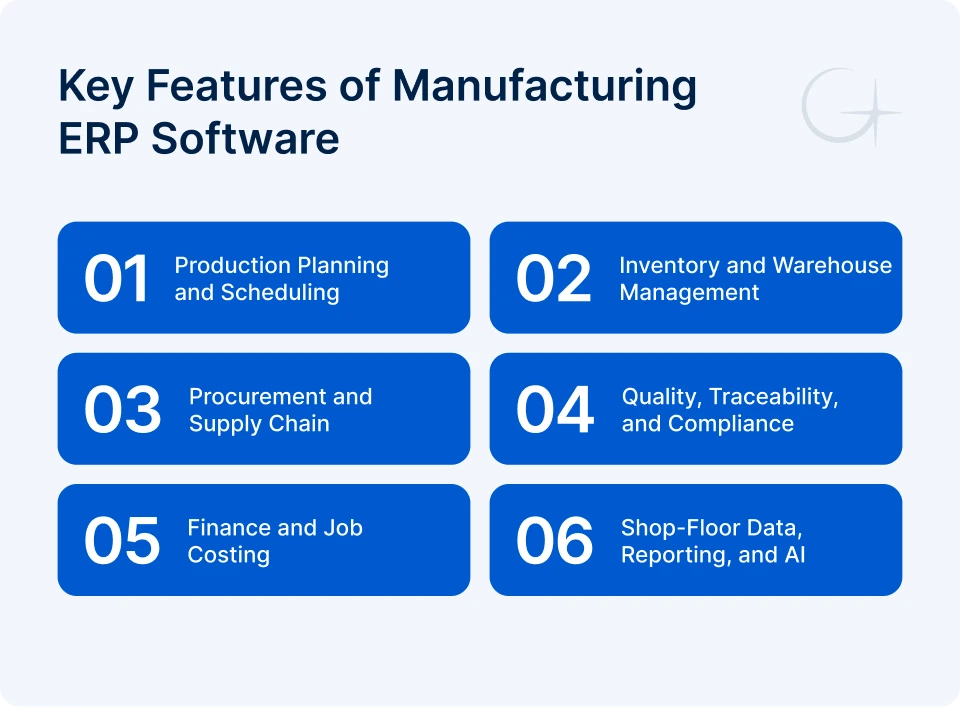
Every ERP feature list looks long on paper. These six areas are the ones that decide whether the system actually works on your floor.
Production Planning and Scheduling
This is where the ERP plans work against real capacity. Look for multi-level bills of materials (BOM), routings, work orders, and finite capacity scheduling. When a rush order lands, the system should show which jobs slip and which work centers overload before you promise a date to the customer. Engineer-to-order shops should check engineering change control on the BOM just as closely as the scheduler.
Inventory and Warehouse Management
Inventory management tracks raw materials, WIP, and finished goods across every location in real time. Barcode or RFID scanning removes most manual counts, and lot and serial tracking ties each unit to the materials inside it. Accurate counts also decide whether MRP is worth having. Feed it bad numbers and it recommends the wrong purchases with total confidence.
Procurement and Supply Chain
Procurement turns material requirements into purchase orders, tracks supplier lead times, and flags late deliveries before they stop a line. Supplier scorecards for price, quality, and on-time performance give your buyers evidence in negotiations. After the lead-time swings of recent years, fast re-planning when a supplier slips matters more than any single feature in a demo.
Quality, Traceability, and Compliance
The quality management (QMS) module records inspections, nonconformances, and corrective actions against the exact lot, batch, or serial number they affect. In a recall or audit, you should be able to trace a finished product back to its raw material lots in minutes.
Compliance needs depend on your industry. Examples include ISO 9001, AS9100 and ITAR for aerospace and defense, FDA 21 CFR Part 11 for medical devices, and FDA food traceability rules for food producers. Choose for the rules that apply to you.
Finance and Job Costing
Job costing connects shop-floor activity to the general ledger. Actual labor, material, and overhead post to each job, so you see the real margin per order instead of the estimate. Variance reports show where costs drift, whether that’s scrap, overtime, or a supplier price change. This is usually the module that wins over the CFO.
Shop-Floor Data, Reporting, and AI
This layer collects machine and labor data and turns it into dashboards for OEE, scrap rate, and on-time delivery.
AI-powered ERP for manufacturing earns its cost in a few specific places: demand forecasting, predictive maintenance from IIoT sensor data, and anomaly detection on quality readings. All three depend on clean data, so add AI once your core records are reliable. An experienced AI development company can usually build these capabilities on top of your existing ERP.
Benefits of Manufacturing ERP Software
The biggest benefit is one version of the truth. Planning, purchasing, and finance stop debating whose spreadsheet is right, and decisions happen in hours instead of days. Day to day, that shows up in five places:
- Planning: schedules built on live capacity and material availability
- Inventory: real-time stock levels across every location
- Costing: actual cost per job as work completes, not estimates after the fact
- Traceability: lot and serial history on demand, instead of records pieced together during an audit
- Multi-site reporting: consistent numbers from every plant
How Much Does Manufacturing ERP Software Cost?
Based on current published pricing from ERP providers and implementation partners, most small and mid-sized US manufacturers should plan for a first-year cost of roughly $100,000 to $750,000, covering software and implementation. Multi-site projects can pass $1 million. Software licensing is usually the smaller share. Implementation, data migration, integrations, and your own team’s time make up most of the bill.
Manufacturing ERP Cost Breakdown
Each cost line has its own drivers, and they compound:
- Software license or subscription: number of users, modules, and deployment model
- Implementation and configuration: process complexity and number of plants
- Customization: workflows the standard system can’t handle
- Data migration: volume and quality of legacy data
- Integrations: how many systems connect, such as MES, WMS, CRM, EDI, and machines
- Training: users, shifts, and locations
- Support and maintenance: level of customization and the support model
Manufacturing ERP Cost by Project Size
Use these as 2026 planning ranges for budgeting conversations, not as quotes.
| Project type | Typical scope | First-year cost (software + implementation) |
|---|---|---|
| Small, single site | 25–50 users, core modules | $100K–$250K |
| Mid-sized | 50–150 users, 1–2 plants, a few integrations | $250K–$750K |
| Multi-site or complex | 150+ users, several plants, heavy integration | $750K–$2M+ |
| Custom manufacturing ERP | Specialized workflows or compliance | $150K–$750K+ build, plus ongoing support |
Cloud vs. On-Premise Manufacturing ERP
Cloud ERP for manufacturing turns software cost into a predictable subscription and removes server upkeep. Many teams start with cloud-based inventory systems before moving the rest of the business to the cloud. On-premise means a larger upfront license and hardware spend, but more control, which some ITAR-regulated plants still require. Hybrid setups keep sensitive or machine-level systems local and run everything else in the cloud.
Hidden ERP Implementation Costs
The surprises rarely come from the license. In Panorama Consulting’s 2026 ERP Report, the most common reasons projects went over budget were needing additional technology mid-project and expanding scope. Budget for these too:
- Time from your best planners and supervisors, pulled away from their regular work
- Data cleanup before migration
- A temporary productivity dip after go-live
- Integration rework when connected systems change
A 10–20% contingency is a sensible cushion.
ERP ROI and Payback Period
Start with annual benefit: labor hours saved, plus lower inventory carrying cost, plus scrap and rework avoided, plus margin protected by better on-time delivery. Subtract ongoing costs such as subscriptions and support, then divide your upfront investment by what’s left. That gives you the payback period in years. Use conservative numbers, because an estimate your CFO trusts is worth more than an optimistic one nobody believes.
Buy, Customize, or Build: Choosing Your ERP Approach
Most manufacturers should start by assuming they’ll buy off-the-shelf manufacturing ERP software. Standard ERP for manufacturers covers most production processes well, and every customization you add is something you maintain through every future upgrade. So focus on where your operation genuinely differs.
| Approach | Best fit | Main advantage | Main trade-off |
|---|---|---|---|
| Buy | Standard processes, common production model | Fastest deployment, provider-managed updates | You adapt your processes to the software |
| Customize | ERP fits most needs, but key workflows don’t | Keeps a proven core while closing gaps | Customizations add cost at every upgrade |
| Build | Specialized processes, compliance, or legacy systems | Full control, no per-user licensing | You own the roadmap and maintenance |
A useful rule: customize only where the difference gives you a competitive edge. If a custom configurator wins you engineer-to-order deals, build it. If it just recreates how you worked in 2009, change the process instead.
For complex operations, a hybrid path is often the lowest-risk option. A standard ERP stays the system of record, and custom ERP development covers the manufacturing workflows it can’t handle. If you take that route, look for a custom software development company with experience in ERP APIs and plant-floor systems, not only web apps.
Before you shortlist anything, check that each option:
- Supports your production model without workarounds
- Integrates with the systems you’re keeping
- Handles multiple plants, current or planned
- Has a five-year total cost of ownership (TCO) you can model
- Comes with a partner who has delivered manufacturing projects
Integrating Manufacturing ERP With Existing Systems
Map your integrations before you choose manufacturing ERP software, not after. A system that looks perfect in a demo gets expensive fast if it can’t exchange data with your MES, scales, or machines.
The usual connections include:
- MES: Real-time production counts and downtime. ERP with MES integration closes the gap between the plan and what happened on the floor.
- WMS: Warehouse execution, especially if you’re investing in custom WMS development.
- CRM: Sales quotes against real availability. CRM software development projects should plan the data flow in both directions.
- EDI: Customer and supplier orders.
- IIoT sensors and PLCs: Machine data from the line.
- Legacy applications: Systems you can’t retire yet.
Ask every ERP provider for documented APIs and real examples of the exact connections you need. “We integrate with everything” isn’t an answer.
Manufacturing ERP Implementation: Process and Timeline
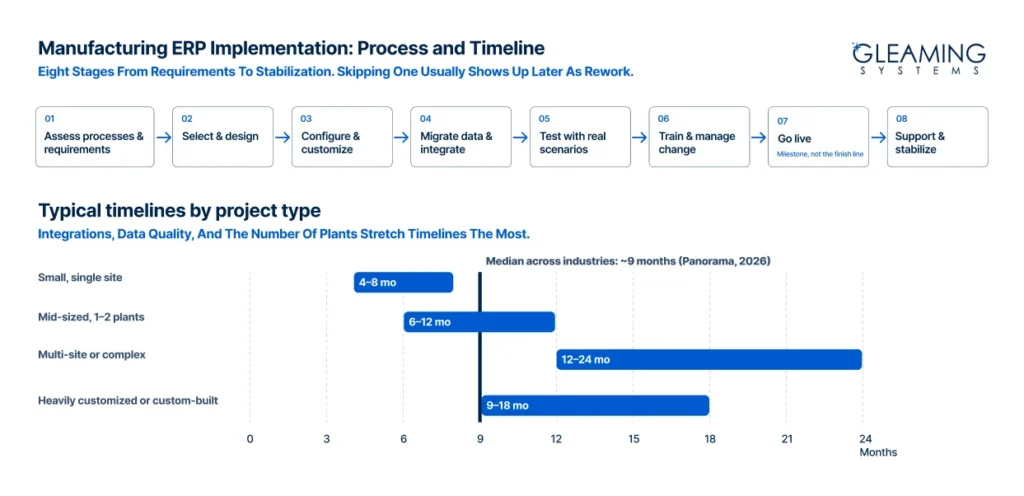
A manufacturing ERP implementation follows eight stages. Skipping any of them usually shows up later as delay or rework.
- Assess processes and requirements: Document how work actually flows, including the workarounds.
- Select and design: Choose your approach and map future-state processes.
- Configure and customize: Set up the system and build only the agreed gaps.
- Migrate data and integrate: Clean BOMs, routings, item masters, and open orders before moving them.
- Test: Run real production scenarios, including the messy ones like partial shipments and rework.
- Train and manage change: Run role-based training on every shift using your own data, and explain what changes for each team.
- Go live: A phased rollout by plant or module is safer than a single cutover for most manufacturers.
- Support and stabilize: Plan for a stabilization period and ongoing software maintenance and support.
Manufacturing ERP Implementation Timeline
How long does ERP implementation take? Panorama’s 2026 ERP Report puts the median at about nine months across industries, and manufacturing projects vary widely around that figure:
- Small, single site: 4–8 months
- Mid-sized, 1–2 plants: 6–12 months
- Multi-site or complex: 12–24 months
- Heavily customized or custom-built: 9–18 months
Integrations, data quality, and the number of plants stretch timelines more than anything else.
Common ERP Implementation Mistakes
Most ERP implementations fail for avoidable reasons, and four of them cause most of the pain:
- Dirty data: Start cleanup before selection, so migration doesn’t stall.
- Over-customization: Challenge every request by asking whether it makes you money.
- Leaving out floor users: Involve supervisors and operators in requirements and testing.
- Treating go-live as the finish line: Keep budget and people for the months after launch.
How Gleaming Systems Helps Manufacturers With ERP
Gleaming Systems works on the parts of an ERP project that standard manufacturing ERP software leaves open: custom modules, integrations, and modernization of legacy systems. That means connecting ERP to MES, WMS, CRM, and machine data, building workflows your ERP can’t handle out of the box, and adding AI forecasting or anomaly detection where your data supports it.
Our work on a quality deficiency management system and advanced asset tracking software for defense equipment dealt with the same core problems manufacturers face: inspection workflows, traceability, and audit-ready records.
If you’re deciding whether to buy, customize, or build, talk to our team about your current systems before you commit to a direction.
FAQs
Can AI be added to an existing ERP?
Yes, in most cases. Forecasting, predictive maintenance, and anomaly detection can run on data pulled from your ERP through APIs, without replacing it. This overview of AI integration explains how that works.
Is ERP worth it for a small manufacturer?
Usually, once spreadsheets start causing late orders or inventory errors. Cloud-based manufacturing ERP software keeps the entry cost manageable, with single-site projects typically starting around $100K in the first year.
Should manufacturers choose cloud or on-premise ERP?
Cloud suits most small and mid-sized manufacturers. On-premise still makes sense where strict data control is required, such as some ITAR-regulated operations.

Team Gleaming Systems
Team Gleaming Systems is a group of tech experts specializing in software, web, and mobile app development. We create innovative, scalable solutions to help businesses succeed in the digital world. Stay tuned for expert insights and industry trends!